
OnePay – Mobile Banking
ONE Finance, Inc.Finance
4.826.13K Reviews
- Version
- 5.101.0
- Installs
- 10.00M
- Age Rating
- Everyone
Screenshots
Our Review of OnePay – Mobile Banking
 Analysis by Appyee
When I use a banking app away from home, the real test often comes down to a small moment: can I check a balance or make a payment while the connection is behaving normally, and do I know what to do if it is not? OnePay is a finance app from ONE Finance, Inc., built around paying, banking, and building credit. That combination makes it more than a place to glance at a balance, but it also means I would treat a working internet connection as part of the everyday experience rather than assume every task can be completed anywhere.
Using OnePay when money decisions happen on the move
For a quick check before buying groceries, confirming a transfer, or reviewing a bill, a phone-based banking app can be more convenient than signing in through a browser on a computer. The useful distinction is between checking information and taking action: I can plan a purchase while I am in line, but I would avoid starting a time-sensitive payment when my signal is dropping or I am about to lose access to the app. If a screen takes longer than expected, waiting for it to finish is safer than tapping the same payment control repeatedly.
A realistic routine might be checking available funds before leaving work, then making a planned payment once I am on a reliable connection. That small pause matters because a bank action should not be judged by whether the button responded instantly. I would look for a clear completion state before assuming a transfer or bill payment went through, and check the account activity again once the app has refreshed. This is a sensible habit with any mobile banking service, especially when a busy network can make feedback feel delayed.
Where a connection matters most
OnePay’s appeal is the idea of keeping everyday money tasks together on a phone. That is useful when I want to check my account, handle a payment, or keep an eye on credit-building activity without switching between unrelated tools. Those actions depend on current financial information, so I would use the app when I have a stable connection rather than count on it as a substitute for a wallet, a saved bill reference, or another way to reach a bank.
There is a practical difference between opening an app to review something and using it to complete a transaction. If I am deciding whether I can afford a non-urgent purchase, a short wait for the account view to load is usually manageable. If I am paying at a checkout or handling a deadline, the same delay can be stressful. I recommend checking what you need before you reach a poor-signal area and leaving urgent payments for a moment when you can confirm the result.
Phone use in everyday settings
Mobile banking is most helpful when it fits into moments that already exist in the day: checking a balance before shopping, reviewing a recent transaction after lunch, or setting aside a few minutes to look at upcoming bills. OnePay’s pay-and-bank focus suits people who prefer to manage these tasks on a phone instead of keeping a separate spreadsheet and making every payment through a different service. For me, the convenience is strongest when I use it deliberately, not when I try to turn every spare minute into a financial check-in.
There are also settings where I would be more cautious. A crowded public network, a weak signal on public transport, or a phone battery close to empty can make banking less comfortable, even if the app itself is straightforward. I would not rush through a transfer while distracted, and I would avoid entering sensitive details where someone nearby can see my screen. These are ordinary mobile-banking precautions, but they matter because convenience can make it tempting to handle money too quickly.
If you are used to checking several bank apps, OnePay may help reduce the number of places you open for routine tasks. It is still worth keeping your own simple record of important due dates and confirming high-stakes payments in the account activity. That is not a criticism of the app; it is a useful boundary for any phone-based financial workflow, where a notification or a momentary loading issue should not be the only evidence that a task is complete.
When something does not load as expected
A delayed screen does not always tell me whether a request failed, is still processing, or simply has not refreshed yet. My first step would be to stop and check the relevant activity rather than repeat the action. If the status is unclear, I would wait for the connection to settle and review the account again before trying anything that could create a duplicate payment. For an urgent issue, I would use the support route available through the service rather than guess based on a spinning screen.
This is one reason I would keep time-sensitive tasks away from the last possible minute. If rent, a bill, or another important payment is due, leaving room to verify it gives me a chance to respond calmly if the app is slow or my connection drops. A mobile interface can make money management feel immediate, but the underlying action may still need time to register. The safest workflow is to submit once, confirm the result, and only then decide whether another step is needed.
It also helps to separate a login problem from a payment problem. If I cannot get into the app, repeatedly entering details while distracted is not a good recovery plan; I would pause, check that my connection is stable, and follow the normal account-access process. If I can sign in but a transaction is not clear, I would review the account activity before resubmitting. These small distinctions reduce the chance of turning a temporary interruption into a second, avoidable problem.
Using data and notifications thoughtfully
Because a banking app needs current account information, I would expect ordinary use to involve internet access. I would not plan a financial task around the assumption that it will work without a connection. If data use is a concern, I would reserve app checks for moments when Wi-Fi or mobile data is available and avoid repeatedly refreshing a page that is taking time to update. That is a practical way to limit unnecessary checking without losing track of important activity.
Notifications can be helpful for staying aware of account activity, but I prefer treating them as prompts rather than as a complete financial record. A notification may bring an event to my attention; opening the app when connected lets me review the account context. For anyone who shares a phone or sees previews on a lock screen, it is also worth considering how much financial detail they want visible at a glance. Keeping alerts useful without making them intrusive is part of making mobile banking fit real life.
One useful habit is to do a short account review during a reliable connection rather than checking repeatedly throughout the day. I can look for payments I recognize, note upcoming obligations, and then close the app. That approach is less distracting than reacting to every small change immediately, while still making use of a phone’s convenience. It is especially helpful for people who are trying to build a clearer picture of spending but do not want banking to become a constant background task.
Who will find the approach useful
I think OnePay is best suited to someone who wants a phone-centered way to handle everyday money tasks and is comfortable managing financial activity digitally. The pay, bank, and credit-building focus gives it a broader role than a simple balance viewer. It may be a good fit if you want one app to be part of a regular routine, such as reviewing spending after payday and checking bills before they come due.
It may be less suitable if you prefer branch-based banking, need a service that works reliably in places where you often have no internet, or want every financial tool kept entirely separate. Someone who depends on a specific account feature should also check that it fits their needs before moving their routine over. I would not choose any finance app simply because it promises convenience; I would first consider how it handles the particular payments, accounts, and credit tasks I use most.
Compared with the usual alternatives, OnePay’s main distinction is its attempt to bring payments, banking, and credit-building into one mobile experience. A traditional bank app may be a better choice for someone who wants to keep their financial relationship centered on an existing bank, while a standalone budgeting tool may be preferable for someone whose priority is detailed spending analysis rather than making payments. OnePay is most compelling when those combined tasks match how you already manage money, not just because having fewer apps sounds appealing.
What to expect before making it part of your routine
OnePay is free, rated for Everyone, and its current version is 5.45.0, with a minimum OS requirement of 7.1. It has an average rating of 4.8 from around 114,000 ratings, and has been installed over five million times. Those figures suggest it has reached a substantial audience, but they cannot tell me whether it matches a particular person’s banking needs. I would use them as context, then make the decision based on the tasks I expect to do and how comfortable I am relying on my phone for them.
For a new user, I would start with a low-pressure setup: learn where the main account information appears, review the payment flow before using it for something urgent, and make sure you understand how to confirm that an action is complete. I would also avoid moving every financial routine into one place on day one. Trying the app for ordinary checks first makes it easier to see whether its organization and connectivity demands suit your habits before you depend on it for a deadline.
OnePay was released on July 23, 2020, and its developer is ONE Finance, Inc. The app’s central promise is a compact mobile home for several kinds of money management, but the quality of that experience still depends on choosing the right moment to use it. I see it as a useful companion for routine financial tasks, not a reason to ignore backup plans or rush through payments when reception is poor.
Have you ever found yourself drowning in a sea of banking apps, each more cluttered than the last? Well, let me introduce you to OnePay – the mobile banking app that might just be the lifeline you’re looking for. I recently took it for a spin, and I've got to say, it was a refreshing change.
Seamless Experience
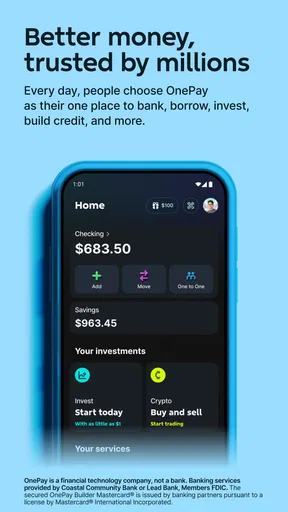
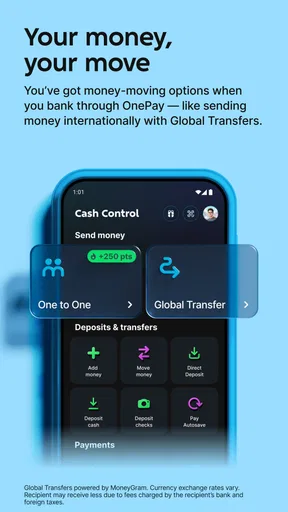
From the moment you open OnePay, you’re greeted with a sleek and intuitive design. It’s like the developers read our minds and knew we wanted something simple and efficient. The layout is clean, with all the essential features just a tap away. There's no need to dig through countless menus to find what you need. Whether you’re checking your balance, transferring funds, or paying bills, everything is right there at your fingertips.
Security First
In this digital age, security is a huge concern, and OnePay doesn’t disappoint. The app uses top-notch encryption to ensure your data is safe from prying eyes. Plus, with biometric login options like fingerprint and facial recognition, you can be sure that only you have access to your financial information.
Features Galore
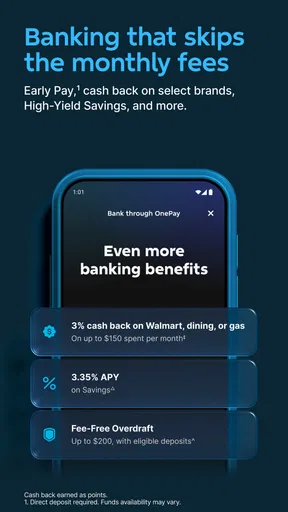
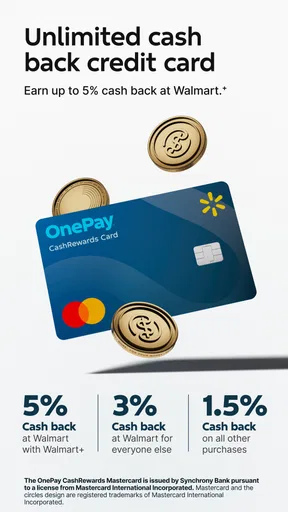
One of the things that really impressed me was the range of features packed into this app. You can set up automatic payments, track your spending, and even receive alerts for unusual activities. It’s almost like having a personal financial advisor in your pocket. And if you're like me and love earning rewards, the app’s cashback feature is a real treat.
User-Friendly Interface
Now, I’m not the most tech-savvy person, but navigating through OnePay was a breeze. The interface is user-friendly, and the app’s performance is smooth – no lagging or crashing here. Everything is clearly labeled, making it easy for anyone, regardless of tech know-how, to manage their finances.
Another cool aspect is the ability to link multiple accounts, which is perfect if you have several bank accounts or credit cards. The real-time updates are a nice touch, ensuring you’re always in the loop with your financial status.
Final Thoughts
At the end of the day, OnePay has managed to create a mobile banking experience that’s both powerful and straightforward. It's an app that doesn't just meet your banking needs but actually enhances the way you manage money. So, if you’re in the market for a new banking app, give OnePay a try – you might just find it’s exactly what you’ve been looking for.
Privacy and Permissions
See what permissions an app requests and how it handles your data.
- Contacts
- read your contacts
- Location
- approximate location (network-based), precise location (GPS and network-based)
- Photos/Media/Files
- read the contents of your USB storage, modify or delete the contents of your USB storage
- Storage
- read the contents of your USB storage, modify or delete the contents of your USB storage
- Camera
- take pictures and videos
- Microphone
- record audio
- Wi-Fi connection information
- view Wi-Fi connections
- Other
- view network connections, change network connectivity, connect and disconnect from Wi-Fi, full network access, run at startup, control vibration, prevent device from sleeping, read Google service configuration
Verdict
Strengths of OnePay – Mobile Banking
- User-friendly interface enhances navigation.
- Real-time transaction updates keep you informed.
- Secure encryption ensures data privacy.,24/7 customer support for quick assistance.
- Multiple account management in one app.
Limitations of OnePay – Mobile Banking
- Limited international transaction options.
- Occasional app crashes reported by users.
- May consume significant battery power.
- Some features require premium subscription.
- Not available in all regions worldwide.
Similar Picks in This Category
View All
Google Wallet
Google LLC4.3

Airtel: Recharge, Bank & Loans
Airtel4.0

PayPal - Pay, Send, Save
PayPal Mobile4.2

DANA Indonesia Digital Wallet
PT Espay Debit Indonesia Koe4.5

Binance: Buy Bitcoin & Crypto
Binance Inc.4.8

Cash App
Block, Inc.4.7
Frequently Asked Questions
What features does OnePay offer for managing finances?
OnePay provides a comprehensive suite of features designed to simplify financial management. Users can easily track expenses, set budgets, and monitor transactions in real-time. Additionally, the app offers bill payment options, mobile check deposit, and the ability to transfer funds seamlessly between accounts. It also includes personalized financial insights.
Is OnePay secure for conducting banking transactions?
Security is a top priority for OnePay. The app utilizes advanced encryption technologies to protect user data and transactions. It includes multi-factor authentication, biometric login options, and fraud monitoring tools to ensure that users can conduct their banking activities with confidence and peace of mind.
Can I use OnePay internationally while traveling?
Yes, OnePay supports international transactions, allowing users to manage their finances while traveling abroad. The app provides real-time exchange rate updates and alerts on international spending. However, users should check with their bank regarding any additional fees that might be applicable for international use.
Does OnePay integrate with other financial tools and apps?
OnePay offers integration with various financial tools and apps to enhance user experience. It can sync with popular budgeting apps, investment platforms, and tax software, allowing users to have a centralized view of their financial health. This interoperability makes it easier to manage finances across different platforms.
What devices are compatible with the OnePay app?
OnePay is compatible with both Android and iOS devices. It supports a wide range of smartphones and tablets, ensuring that users can access their banking services on the go. The app is optimized for different screen sizes and operating systems, providing a seamless user experience across all devices.
